Subscription fatigue is at an all-time high. Between cloud storage, design tools, and productivity apps, the last thing you need is another monthly charge just to take a decent screenshot. The good news? You don't have to.
And the timing has never been better to make the switch. In early 2025, TechSmith officially killed the perpetual license for Snagit - one of the most popular screenshot tools in the world - and moved to a subscription-only model. If you stop paying, you lose access. Many longtime users were understandably frustrated.
But that shift created an opportunity: a new wave of excellent screenshot tools now compete directly on the "pay once, own it forever" promise. In this guide, we've rounded up the best one-time purchase screenshot tools available in 2026 - what they do well, who they're built for, and how much they cost.
Why One-Time Pricing Matters More Than Ever in 2026
The Snagit move to subscriptions is part of a broader industry trend, but users are pushing back. Reddit threads, Product Hunt comments, and indie communities are full of people specifically hunting for tools that respect the buy-once model.
Here's what you actually get with one-time purchase software:
- Permanent ownership - the software is yours, full stop
- No access lost if you cancel - because there's nothing to cancel
- Better long-term value - especially for tools you'll use for years
- Privacy by default - many one-time tools keep everything local, no cloud account required
With that said, here are the best options in 2026.
1. Savvyshot - Best for Beautiful, Share-Ready Screenshots (Windows & Mac)
Price: One-time license · Free to download (license removes watermark and unlocks all features)
Platforms: Windows, macOS
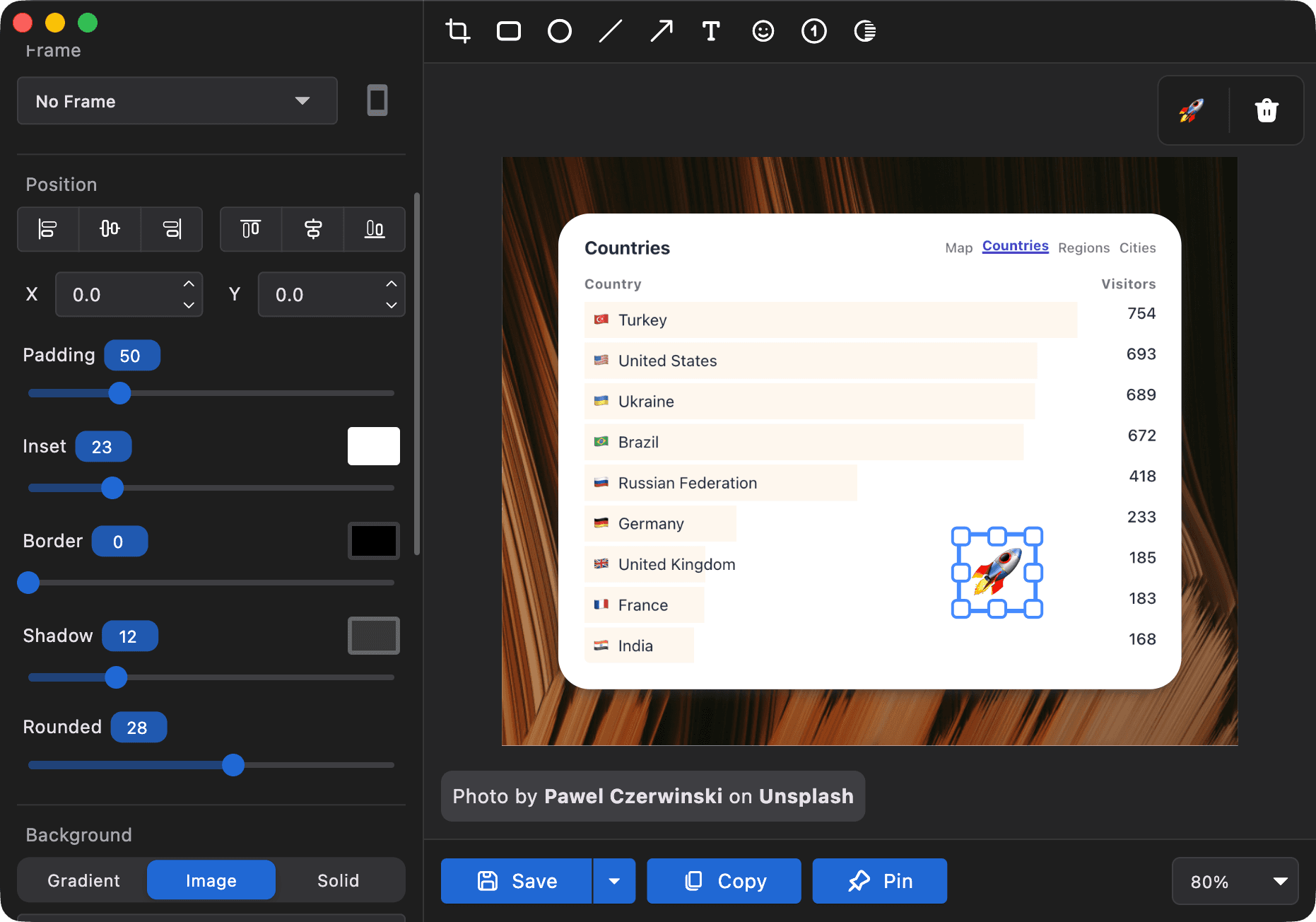
If your goal is screenshots that look polished - not just captured - Savvyshot is the standout choice, and the only tool on this list that works natively on both Windows and Mac with a full beautification suite.
It's built for makers, marketers, designers, and anyone who regularly shares screenshots in documentation, social media, or product demos. The workflow is fast: capture, beautify, share - without touching another tool.
Key features:
- One-click capture of any region, window, or full screen
- Custom backgrounds, gradients, padding, shadows, and border controls
- Full annotation toolkit: arrows, shapes, highlights, and text
- Auto-redaction of sensitive data (emails, credit card numbers) using on-device OCR
- Manual blur for hiding any area of a screenshot
- Multiple editor tabs for working on several screenshots at once
- Everything processed locally - nothing uploaded to external servers
- Customizable keyboard shortcuts
- One-time license with free lifetime updates
The privacy-first, offline-by-default design is increasingly rare in 2026, where most competitors require a cloud account just to share a file. With Savvyshot, your screenshots stay on your machine unless you choose to share them.
Best for: Windows and Mac users who want professional-looking screenshots fast, without a subscription or cloud dependency.
2. Xnapper - Best for Social Media Screenshots (Mac)
Price: $24.99 one-time (single device)
Platforms: macOS only
Xnapper is a Mac-only screenshot beautifier designed specifically for creators who share visuals on social platforms. It's fast, opinionated, and purpose-built for making screenshots look great in seconds.
Key features:
- Auto-balance layouts with one click
- Pre-built aspect ratio templates for Twitter/X, LinkedIn, and other platforms
- Multiple presets to save and reuse your preferred styles
- Annotation tools including highlights and instruction overlays
- Clean, distraction-free interface
Where Xnapper falls short is flexibility - capture options are limited, and there's no built-in cloud sharing or link generation. It's most useful as a post-capture beautifier rather than an all-in-one tool.
Best for: Mac-based content creators focused on polished social media screenshots.
3. Shottr - Best Lightweight Precision Tool for Developers (Mac)
Price: $8 one-time (Basic) · $30 (Friends Club with early feature access and priority support)
Platforms: macOS only
Shottr has built a loyal following among developers and designers who want precision tools without the weight of a full-featured app. At just 2.3MB, it runs quietly in the background and stays out of your way.
Key features:
- Scrolling capture for full-page screenshots
- OCR - copy text directly from any screenshot
- QR code recognition
- Pixel ruler and on-screen color picker
- Smart Select Mode: auto-balances padding when capturing UI elements
- Blur tool for sensitive areas
- Backdrop tool for adding background colors and shadows
The trade-offs are real: no screen recording, no cloud sharing, and beautification options are more limited than dedicated tools. But at $8, it's arguably the best value on this entire list for its target audience.
Best for: Developers and QA testers who need fast, pixel-perfect captures without any bloat.
4. CleanShot X - Best Full-Featured Screenshot Tool for Mac
Price: $29 one-time (app only) · Optional CleanShot Cloud subscription for link sharing
Platforms: macOS only
CleanShot X remains the benchmark for Mac screenshot tools in 2026. It combines the widest range of features with a polished, native-feeling interface - all for a one-time base price.
Key features:
- Scrolling capture for full pages and documents
- Screen recording and GIF creation
- Quick Access Overlay for instant editing right after capture
- Background templates for beautified screenshots
- OCR text recognition
- Desktop icon hiding for clean captures
- Instant copy-to-clipboard after every capture
The core app is a one-time $29 purchase. Cloud sharing features (instant shareable links) require an additional CleanShot Cloud subscription. For most solo users, the local app alone covers everything they need day to day.
Best for: Mac power users who want the most feature-complete screenshot tool available.
5. PicPick - Best Free-for-Personal-Use Tool (Windows)
Price: Free (personal use) · One-time commercial license for business use
Platforms: Windows only
PicPick is a surprisingly full-featured screenshot editor that feels like a lightweight Photoshop. For personal use, it's completely free. For commercial use, a one-time license keeps you off the subscription treadmill.
Key features:
- Eight capture modes: region, window, full screen, scrolling, and more
- Built-in image editor with effects, blur, resize, crop, and drawing tools
- Pixel ruler, color picker, protractor, and magnifier
- All screenshots indexed in the interface for easy management
- Direct export to email, printer, cloud services, and more
PicPick is particularly popular among technical writers and support teams who need both powerful capture and a capable editor - without spending anything for personal use.
Best for: Windows users who want a versatile editing suite alongside their screenshot tool.
6. Greenshot - Best Free Open-Source Option (Windows)
Price: Free and open source
Platforms: Windows (macOS version available on the App Store)
Greenshot has been a staple on Windows for years, and for good reason. It's open source, completely free, extremely lightweight, and does exactly what it says - quickly and reliably.
Key features:
- Capture region, active window, full screen, or scrolling web pages (Internet Explorer)
- Built-in editor with arrows, highlights, text, and shape tools
- Blur tool for hiding sensitive information
- Export to file, printer, clipboard, email, Flickr, and more
- Runs from the taskbar with keyboard shortcut support
It doesn't offer the visual polish or beautification of newer tools, but as a no-cost, no-fuss capture-and-annotate solution, Greenshot remains a dependable choice in 2026.
Best for: Windows users who need a reliable, free screenshot tool with solid annotation features.
7. FireShot Pro - Best for Full-Page Web Captures
Price: $99.95 lifetime license
Platforms: Browser extension (Chrome, Firefox, Edge, Safari)
FireShot Pro is a browser extension that specializes in one thing: capturing entire web pages perfectly. If your work involves archiving, legal documentation, or QA testing of web content, it's in a category of its own.
Key features:
- Full-page scrolling capture with active links and searchable text
- Annotation, highlight, and blur tools
- Export to PDF (with embedded links), PNG, JPEG, or GIF
- Batch capture of multiple URLs at once
- API access for automated workflows
- 48,000+ reviews on the Chrome Web Store
- Lifetime license - no renewals
The upfront cost is the highest on this list, but for professionals who rely on complete web captures daily, the one-time lifetime license pays for itself quickly.
Best for: Researchers, QA engineers, legal teams, and bloggers who regularly need full, reliable web page captures.
Quick Comparison
| Tool | Platform | Price | Best For |
|---|---|---|---|
| Savvyshot | Windows & Mac | One-time license | Beautiful, share-ready screenshots |
| Xnapper | Mac only | $24.99 | Social media creators |
| Shottr | Mac only | $8–$30 | Developers & pixel-precise tools |
| CleanShot X | Mac only | $29 | Full-featured Mac power users |
| PicPick | Windows only | Free (personal) | Windows editing suite |
| Greenshot | Windows | Free | Basic free capture & annotation |
| FireShot Pro | Browser extension | $99.95 | Full-page web captures |
What About Snagit in 2026?
It's worth addressing directly: Snagit used to be the go-to recommendation for a professional screenshot tool. It no longer belongs on a one-time purchase list.
In early 2025, TechSmith officially moved Snagit to a subscription-only model starting with Snagit 2025. New users now pay $39/year (individual) or $48/year (business). If you stop paying, you lose access to all 2025 and later versions. Legacy users with active maintenance agreements were converted to a "Legacy License" subscription, keeping their discounted rate until at least 2030 - but they're still on a subscription.
If you already own Snagit 2024 or earlier, you can keep using that version indefinitely. But for anyone buying fresh in 2026, the tools above offer better long-term value.
Which Tool Should You Choose?
-
You're on Windows or Mac and want great-looking screenshots → Savvyshot is the obvious pick. It's the only tool here that covers both platforms with a full beautifier, annotation tools, privacy-first processing, and a genuine lifetime license with free updates.
-
You're a Mac power user who needs everything → CleanShot X at $29 is the benchmark.
-
You're a developer who wants precision without bloat → Shottr at $8 is the best value screenshot tool available.
-
You need full-page web captures for research or legal work → FireShot Pro is purpose-built for that.
-
You're on Windows with a tight budget → PicPick (free for personal use) or Greenshot (free, open source) both deliver solid results.
The Bottom Line
The Snagit subscription shift is a reminder that software you rely on daily shouldn't come with an expiration date tied to your payment method. The tools on this list prove that one-time pricing and professional-grade features aren't mutually exclusive.
If you want a cross-platform tool that produces polished, professional screenshots without a cloud account, recurring fees, or privacy trade-offs, Savvyshot is the most complete solution available for Windows and Mac users in 2026.
👉 Download Savvyshot for free - upgrade once to remove the watermark and unlock every feature, forever.